hit CTRL+F and search for <div class="epost"> to edit the desc between <li> and </li> tags
replace default skins with your custom ones
name your skins as much as you like! 

sion here! this is an english tutorial on how to setup an oekaki board on your website! the term oekaki is for drawing bulletin boards which were very popular in early-mid 2000s. some oekaki also had different boards: practice mode, theme prompt and free drawing.
to install your oekaki board, youll need to be signed up on leprd.space and download the latest version of potiboard evo. the english package can be found here.
unpack the .zip with whatever you have (i used a free trial version of winrar) and drag the potiboard5 folder somewhere. rename that folder to whatever is related to oekaki!

now open up config.php located in your folder. any text software like notepad, vscode or notepad++ will do.
here you will see that everything is set to default. change the title to whatever itll be and do the same with the root directory and main site. heres the example:
    // 設置場所のURL。potiboard.phpのあるディレクトリの"/"まで

// メール通知のほか、シェアボタンなどで使用

// Installation URL. In the directory where potiboard.php is located, and need last "/".

// Be used notification by email, and share button, etc.
define("ROOT_URL", "https://your.site/oekaki/");


//掲示板のタイトル(<title>とTOP)

//Board title (appears in <title> and site header)

define("TITLE", "oekaki bbs");


// URL to link your own site. They had own sites ago.

// Absolute path is OK.

define("HOME", "https://your.site/");
even the administrators password is set to default. replace adminpass with YOUR OWN password because if you dont anyone could edit or delete so yea. example shown below:
// 管理者パスワード

// 必ず変更してください。

// Administrator password, make sure to change it.

$ADMIN_PASS = "redacted";
the skin directory is mono_en/ by default. if you wanna have your own skins you can just save any default skin as your own! eg. skin.css
btw im no expert on custom skin folders but if you create a new folder in templates/ and name the folder eg. frutiger then copy+paste all the files from mono_en it should be ok right?
here are some files to go wild with your skins!!!
hit CTRL+F and search for <div class="epost"> to edit the desc between <li> and </li> tags
replace default skins with your custom ones
name your skins as much as you like!
done with your configuration and customization? great! lets head over to uploading your oekaki board!
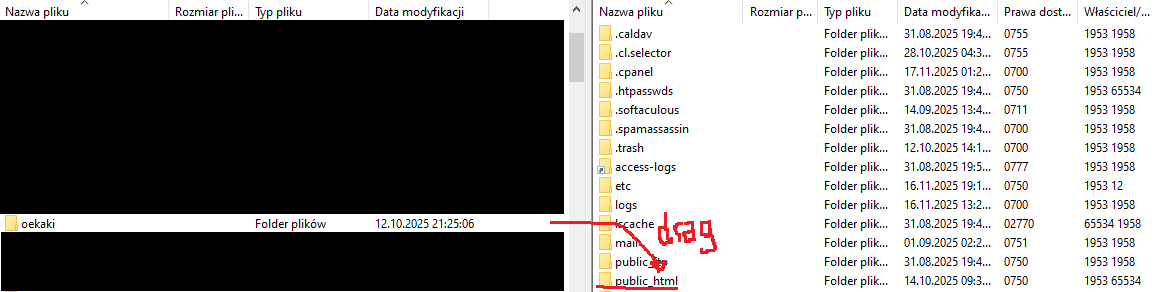
open filezilla client. go to file > site manager and connect to your ftp network (see filezilla basics). now drag your oekaki folder to public_html and check if it works!
aaand tada!!! youre finally done! satisfied with the result? im sure you are!
im glad you enjoyed the oekaki board experience. cant wait to see how yours turned out!!!